
Studio Digital Rights Management
Enforce copyright licensing and prevent unauthorized distribution using FairPlay, Widevine, and PlayReady.
Studio DRM lets you control how and when customers consume content with minimal changes to your existing workflow. Studio DRM provides the capability to:
- Comply with copyright licensing by restricting playback of your digital media.
- Prevent unauthorized distribution of your digital media.
DRM Solutions
Protect your digital media using one or more of the following DRM solutions:
-
Apple FairPlay Streaming (FPS): Use this DRM solution primarily for Apple devices.
-
Google Widevine: Use this DRM solution primarily for Android, Chrome browsers, and Chromecast devices.
-
Microsoft PlayReady: Use this DRM solution primarily for Roku, Xbox, and the Microsoft Edge browser.
Basic Setup
Setting up Studio DRM consists of the following steps:
-
Studio DRM Activation: Contact your account manager to activate Studio DRM on your account.
-
Apple FairPlay Streaming (FPS) Only
- Register as a licensed content owner with Apple.
- Submit your FPS deployment package information via the CMS (Uplynk account must be enabled for DRM).
-
Studio DRM
Type DRM Token Live Event # # Live Channels # # CMS Assets (Non-slate) # # CMS Assets (Slate for Live Event or Live Channels)
Learn more. -
Studio DRM Policy: Define a Studio DRM policy, which determines the conditions under which content may be played, via the playback URL's query string.
Use a Studio DRM policy configuration and/or the parameter expansion capability to obfuscate your Studio DRM policy.
-
Media Player Setup
Configure your media player to:
- Point to a signed playback URL for the desired live event, live channel, or CMS asset. This playback URL should include a query string that defines a Studio DRM policy.
- Acquire a license from our license servers.
Requirements
Basic requirements are listed below.
| Requirements | Description |
|---|---|
| Studio DRM | Please contact your account manager if Studio DRM has not been activated on your account. |
| Live Slicer | Version 18052400 or higher |
| Live Events Live Channels CMS Assets |
|
Use one of the following DRM platforms / clients:
| DRM Platform | ABS | Encryption Method | Recommended Clients |
|---|---|---|---|
| Apple FairPlay Streaming | HLS | AES-128 CBCS | iOS Apple TV Safari on macOS |
| Google Widevine DRM | MPEG-DASH | AES-128 CENC | Android Chrome Chromecast Firefox Shaka Player Exoplayer for Android Bitmovin |
| Microsoft PlayReady | MPEG-DASH | AES-128 CENC | Windows Roku Xbox One |
How Does It Work?
By default, encryption is applied to all video content regardless of whether Studio DRM will be enforced. Playback of encrypted HLS/DASH content requires decryption using the Content Key through which it was encrypted. Typically, this key is securely communicated to the media player by signing the playback URL. However, the key is handled in cleartext by both the viewer's platform and player/client, making it vulnerable to compromise.
Studio DRM applies an additional level of protection by requiring a player to request a license. A license contains an encrypted Content Key and allows the publisher to apply security policies that determine the conditions under which content may be played. By preventing a player from directly requesting a Content Key, the key exchange typically takes place in a Trusted Execution Environment (TEE). This makes it more difficult for an attacker to gain access to keys.
Ingest
Studio DRM does not introduce changes into the workflow for ingesting live or on-demand content.
Playback
Playback of Studio DRM-protected content requires the viewer's player/client to request a license from our license servers. The workflows for HLS and DASH are described below.
Basic HLS Workflow (Apple FairPlay Streaming)
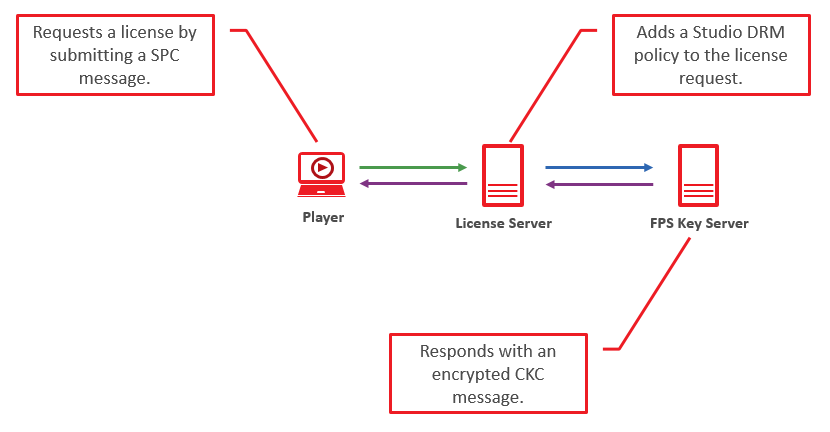
- Player requests SPC message from our license server.
- The player requests a manifest file in response to a request to play encrypted HLS content.
- Our system responds with the requested manifest file.
- The player requests a key from the operating system.
- The operating system returns an encrypted SPC message to the player.
- The player then submits this SPC message to our license server.
- Our license server identifies the Studio DRM policy for the requested content and then forwards the request, including the Studio DRM policy, to an FPS key server.
- If the client satisfies this policy, the FPS key server sends an encrypted CKC message containing the key to the player via our license server.
- The player passes this CKC message to the OS to initiate playback.
Basic DASH Workflow (Google Widevine and Microsoft PlayReady)
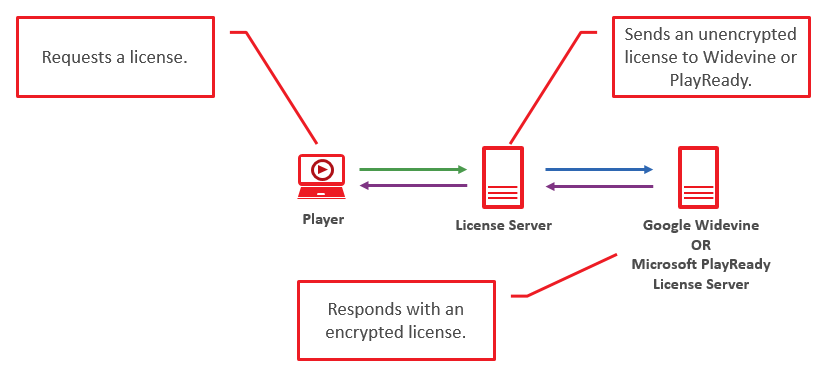
- In response to a request to stream Studio DRM-protected content, the player submits a license request to our license server.
- The player requests a manifest file in response to a request to play Studio DRM-protected content.
- Our system responds with the requested manifest file.
- In response to the manifest file, the player generates a license request and submits it to the platform security layer (e.g., MediaDRM or Encrypted Media Extensions).
- The platform security layer returns license request data to the player. The player uses this data to submit a license request to our license servers.
- Our license server identifies the Studio DRM policy for the requested content. If the player satisfies this policy, a Widevine/PlayReady license is generated and forwarded to a Widevine or PlayReady license server.
- The Widevine or PlayReady license server encrypts the license and delivers it to the player via our license server.
- The player uses this license to initiate playback.
More Information
Updated 3 months ago