
Ad Verification
Set up ad verification and the HLS and DASH signalling it relies on.
Ad Verification
Ad verification is only supported when using VAST 3.x or 4.0.
Measure ad viewability by customizing your player to extract verification data from the manifest file and send it to an ad verification system via the Open Measurement Interface Definition (OMID).
Ad Verification Workflow for Live Streams
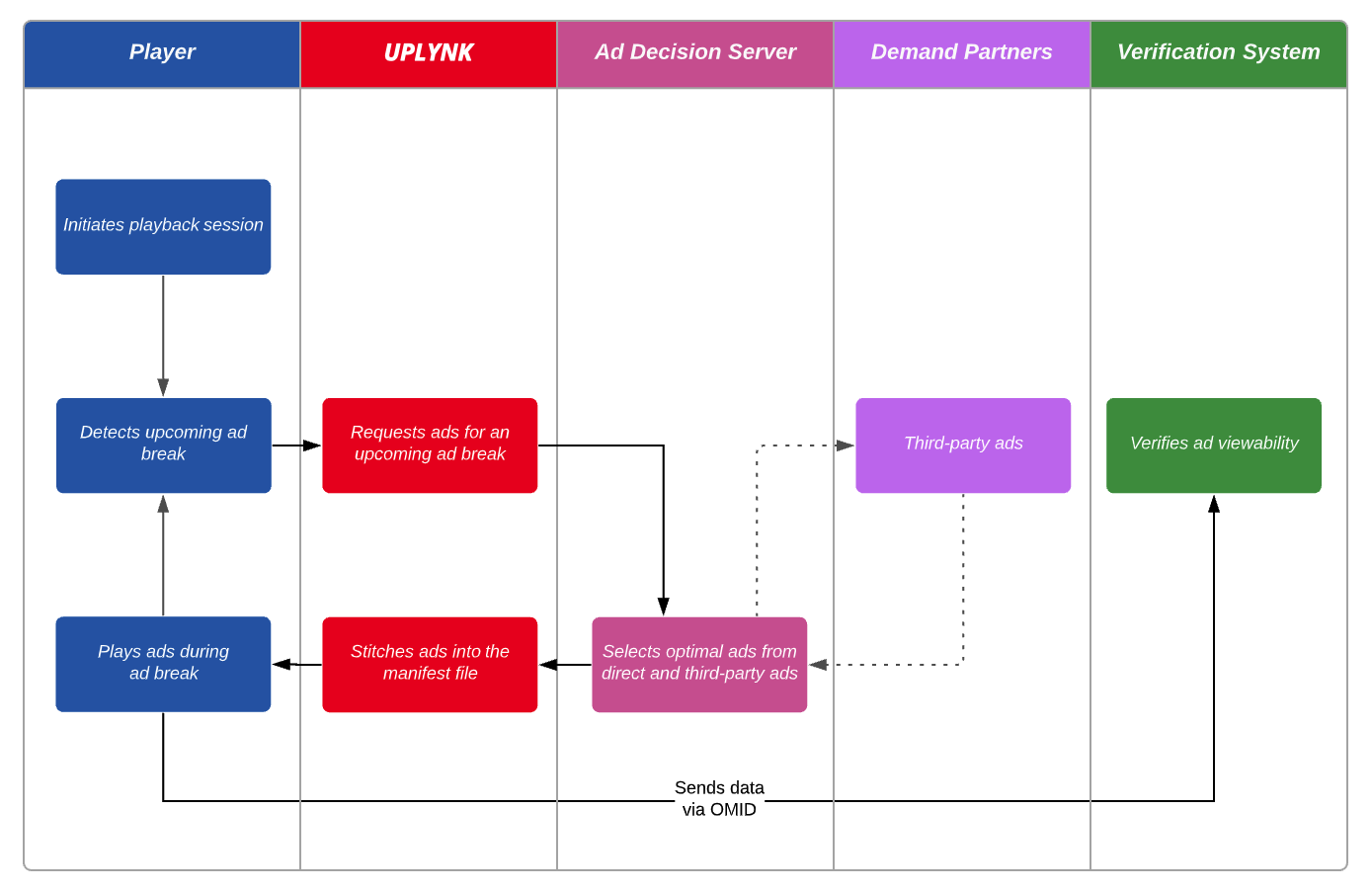
Ad verification works with our Prebid feature. However, it has been omitted from this workflow for the sake of simplicity.
Ad Verification Workflow for VOD
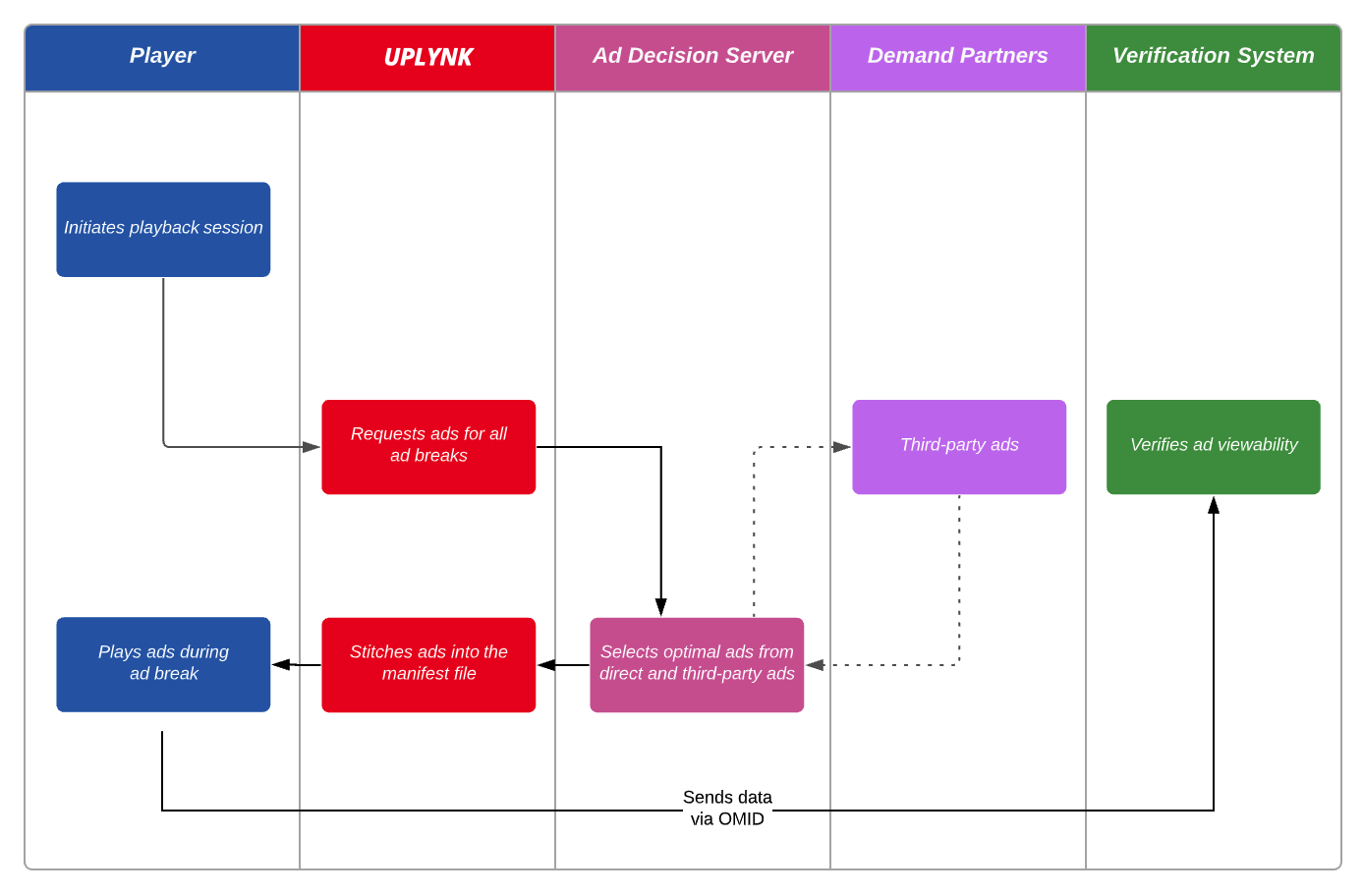
Ad verification works with our Prebid feature. However, it has been omitted from this workflow for the sake of simplicity.
Setup
Ad verification requires an Interactive Advertising Bureau (IAB) account. If you do not currently have an account, please create one.
Setting up ad verification requires updating your player to:
- Identify the type of ad verification data that will be inserted into the manifest file.
- Extract ad verification data from the manifest file.
- Send verification data to the ad verification system via OMID.
Steps 2 and 3 are outside the scope of this document. Please refer to the documentation provided by your ad verification system to learn how to provide ad verification data via OMID.
Ad Verification Data
Add ad verification data to the manifest by including one or more of the following query string parameter(s) in the playback URL:
| Query String Parameter | Description |
|---|---|
| timedmeta.events.ads | Inserts tracking event data from the VAST response. This data is reported within an EXT-X-DATERANGE ad marker tag whose class/scheme identifier is urn:uplynk:ad-data:events. Example: timedmeta.events=complete,midpoint |
| timedmeta.extensions.ads | Inserts custom VAST extensions data. This data is reported within an EXT-X-DATERANGE ad marker tag whose class/scheme identifier is urn:uplynk:ad-data:data:extensions. Example: timedmeta.extensions=waterfall,geo |
| timedmeta.schemas.ads | Inserts ad viewability data. This data is reported within an EXT-X-DATERANGE ad marker tag whose class/scheme identifier is urn:uplynk:ad-data:omsdk. Example: timedmeta.schemas.ads=omsdk |
Initiating a playback session with one of the above query string parameters includes the requested data from the ad node returned by the Preplay API within the manifest file. Information on how this data is inserted into the manifest file for HLS and DASH is provided below.
Test your ad verification workflow by passing
staticomsdk=1as a query string parameter in the playback URL for the desired live event or live channel. This parameter, which inserts a static JSON payload into the manifest, cannot be used to test the ad verification workflow for VOD content.
An ad marker tag (i.e.,
EXT-X-DATERANGE) will be inserted for each parameter defined in the playback URL. For example, if you specify both timedmeta.events.ads and timedmeta.extensions.ads, then two ad marker tags will be added to the manifest file.
Timed metadata does not currently return data that allows a player to signal their position in a stream. This means that players must still use data from the Ping API to signal their position in a stream.
HLS
Inserts a Base64-encoded JSON payload into the X-DATA attribute of the EXT-X-DATERANGE tag of an HLS manifest.
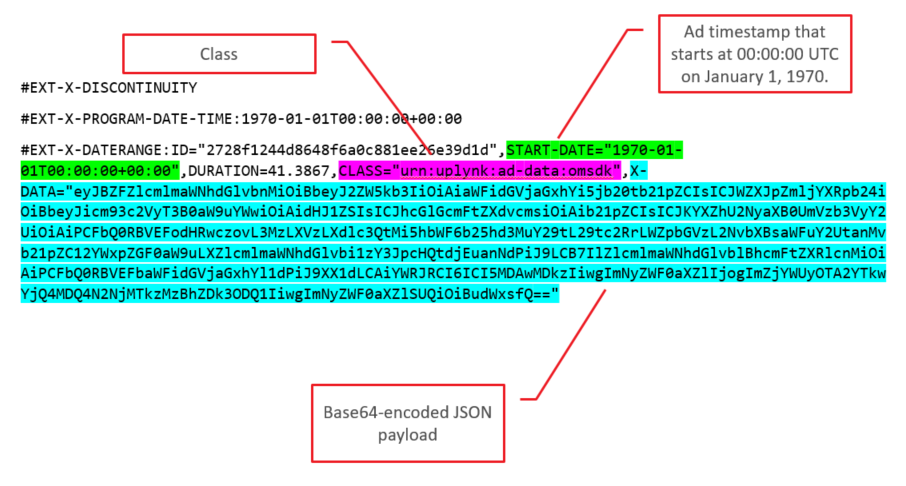
For each ad, the START-DATE attribute of the EXT-X-DATERANGE tag will have the same value as the corresponding EXT-X-PROGRAM-DATE-TIME tag. The specified timestamp doesn't reflect playback time. Instead, the first ad in a stream will be assigned a timestamp of 1970-01-01T00:00:00+00:00. Each subsequent ad will be assigned a value that takes place after the previous ad.
DASH
For each ad, an <Event> node will be inserted within an <EventStream> node in that ad's period within the DASH manifest. This Event node will contain the JSON payload as shown below.
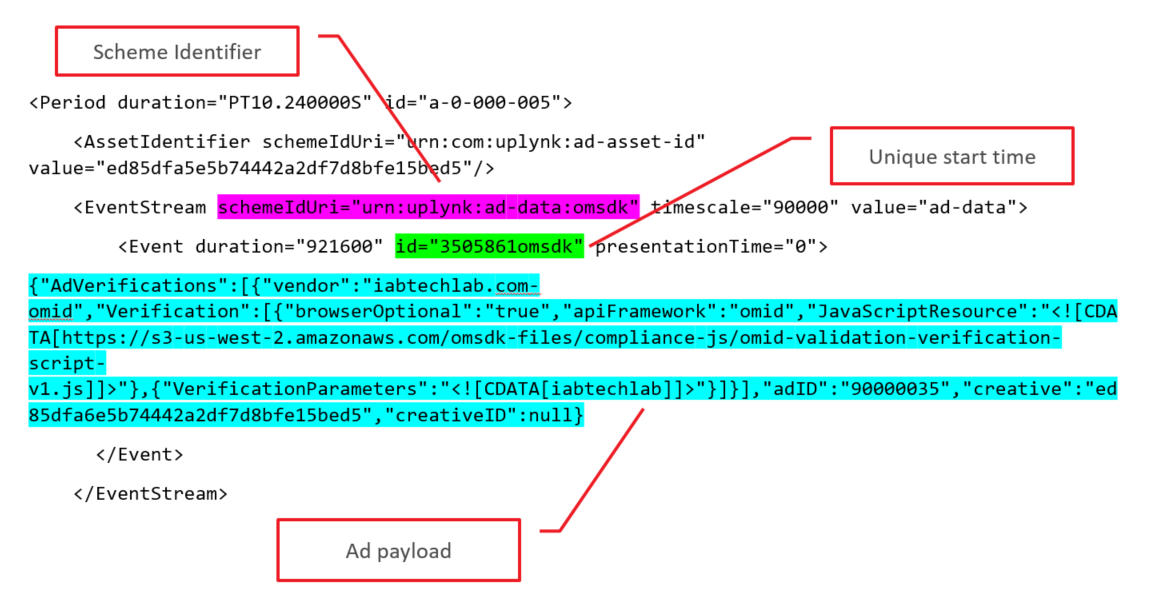
In order to improve readability, a formatted version of the above sample JSON payload is provided below.
{
	"AdVerifications": [{
			"vendor": "iabtechlab.com-omid",
			"Verification": [{
					"browserOptional": "true",
					"apiFramework": "omid",
					"JavaScriptResource": "<![CDATA[https://s3-us-west-2.amazonaws.com/omsdk...]]>"
				}, {
					"VerificationParameters": "<![CDATA[iabtechlab]]>"
				}
			]
		}
	],
	"adID": "90000035",
	"creative": "ed85dfa6e5b74442a2df7d8bfe15bed5",
	"creativeID": null
}
Updated about 2 months ago